We use cookies to ensure you have the best experience on our website. If you continue to use this site, we will assume that you agree with our Privacy Policies , Use Terms and cookies.

Module IT Management

Your computer fleet on autopilot

Inventory, remote maintenance, AI-powered Smart X-Ray, remote access and cloud costs in a single dashboard, right next to your team's productivity.

Smart X-Ray
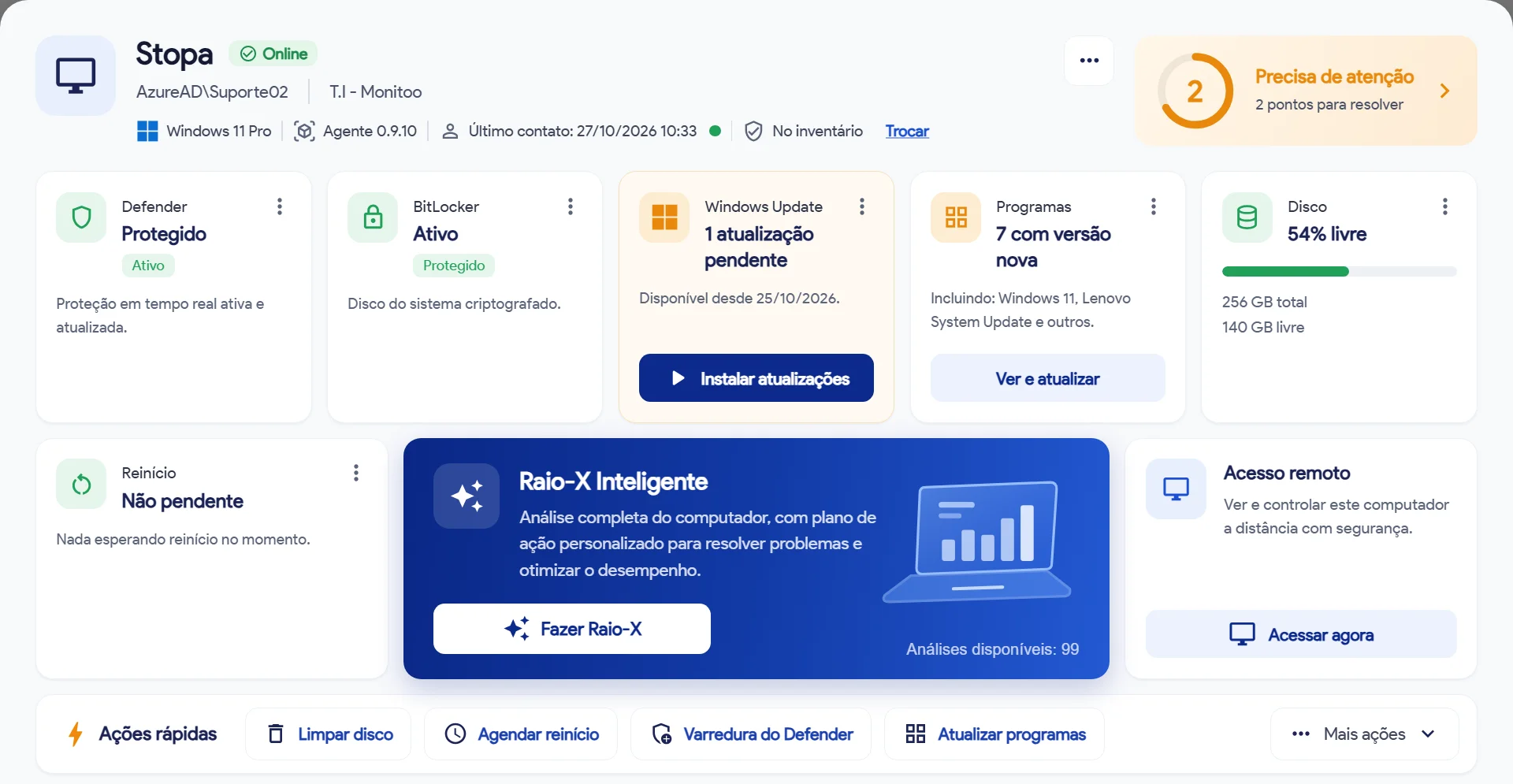
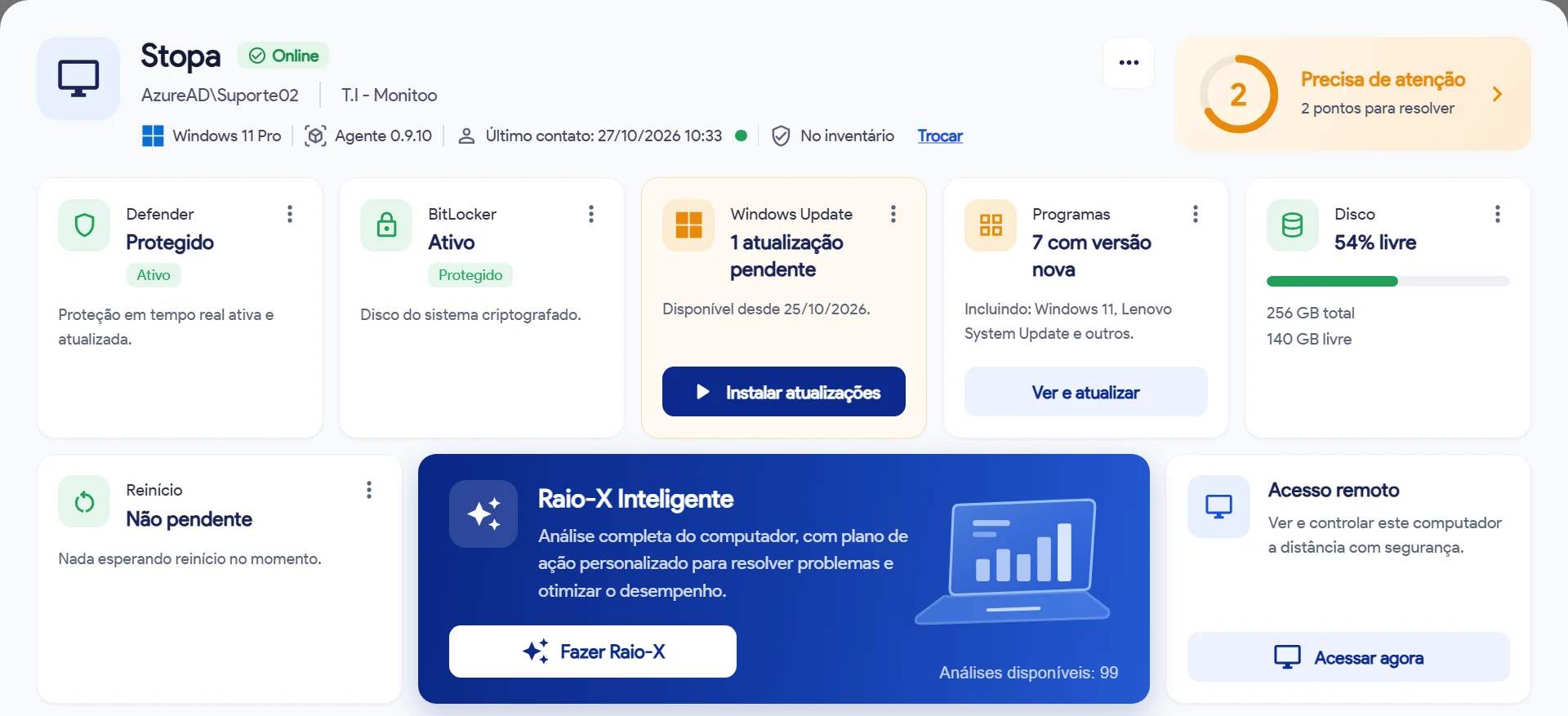
Computer details page in the IT Management module
1-click fixes
What changes in your IT routine

Stop firefighting. Start preventing.

Without Monitoo
With Monitoo
You only hear about a problem when a user calls to complain
→
You get alerted first and fix it without anyone stopping work
Half an hour of travel just to install a program
→
Fix it from your desk in one click, at headquarters, a branch or a home office
An inventory spreadsheet that is out of date the day it is created
→
Every computer and program listed automatically, always up to date
Money going out every month for licenses nobody opens
→
See exactly how much you are wasting and cut it at the next renewal
A single machine without antivirus is enough to open the door to an attack
→
Your whole fleet checked automatically, with alerts for what needs attention
Leadership only thinks about IT when something goes wrong
→
Ready-made reports that show the value of IT and how much it saved
FEATURES

Everything your IT team needs,in a single module

01

Automatic inventory

  • Overview of your entire fleet
  • Hardware and software on every computer
  • Active computers missing from the inventory
02

Software and licenses

  • Installed vs. used in the last 30 days
  • Approve or block software
  • Contracts and paid licenses nobody uses, with the cost
03

Policies and compliance

  • Fleet policies with deadlines to resolve
  • Antivirus, disk encryption and updates
  • Former employees with activity after offboarding
04

Remote maintenance

  • Health alerts for every computer
  • Windows Update and software updates
  • Install and remove software, clean up disks and schedule restarts
05

Smart X-Ray

  • AI diagnostics for one computer or your whole fleet
  • Score, critical items and a prioritized action plan
  • PDF report sent by email
06

Remote access

  • View and control the computer from your browser
  • Support without travel
  • No separate paid remote access tool
07

Actions and automations

  • Work orders that close themselves when the problem goes away
  • Quick bulk actions
  • Automations for repetitive tasks
08

Cloud costs

  • AWS, Azure and Google Cloud with read-only access
  • Cost per service, budgets and alerts
  • Where to save, plus unused Microsoft 365 licenses
09

For teams that serve multiple clients

  • Technician dashboard across multiple clients
  • Monthly report for each client
  • Option to have the Monitoo team manage it for you
Inside the module

Everything about a computer on one screen

Each computer's details page shows what needs attention and offers the fix right there. Click the image to enlarge.

Computer details page with Defender, BitLocker, Windows Update, software, disk, Smart X-Ray and remote access
  1. Needs attentionA summary of what to fix first on each machine.
  2. Security at a glanceAntivirus, disk encryption and pending updates.
  3. Smart X-RayA full analysis with an AI-generated action plan.
  4. Remote accessConnect to the computer securely, straight from the dashboard.
  5. Quick actionsClean up disks, schedule restarts, run scans and update software.
Stronger together

IT Management + Productivity: what no other system shows you

When Monitoo sees both the computers and the work at the same time, the numbers finally add up.

Installed software+Actual usage=Licenses to cut

Pay only for what your team uses

The inventory tells you what is installed; productivity tells you what is actually used. The difference turns into real savings.

AI adoption+Licenses=Smarter renewals

Copilot, ChatGPT and more, backed by data

See who uses each AI tool before you renew or add licenses.

Offboarding+Activity=Forgotten access

Former employee still active? You will know

Computers and accounts with activity after offboarding show up as alerts.

One dashboard+One login=Fewer tools

People and computers in the same place

Same platform, same GPO deployment, same support. AI on both sides: Ask Monitoo and Smart X-Ray.

Who it is for

Built for the people who keep operations running

Lean in-house IT

One or two people looking after dozens of computers, with no time to go desk to desk.

IT service providers

Teams serving several companies that need a dashboard per client and a ready-made monthly report.

Finance and leadership

Anyone who wants to know how much is spent on software, licenses and cloud, and where to save.

How it works

From the first computer to your entire fleet

Install

Deploy the agent across the network (GPO) or directly on each workstation, just like you already do with Monitoo.

See

Inventory, alerts and Smart X-Ray start showing up in the dashboard.

Fix

Fix issues in one click, connect remotely and track your savings month by month.

Frequently asked questions

Questions about the module

I already use Monitoo for productivity. Do I need to change anything?

No. The module runs on the same platform with the same login. Maintenance uses a companion agent, deployed the same way (GPO).

Which computers does it work on?

Windows computers. Talk to our sales team to check your fleet.

Do I need another remote access tool?

No. Remote access runs right from the Monitoo dashboard, in your browser.

Is it secure?

Commands sent to computers are signed, cloud connections are read-only, and the dashboard has single sign-on (SSO), two-factor authentication and a log of who did what.

Can I buy IT Management on its own?

Yes. Modules are sold separately, and our sales team builds a proposal for the size of your fleet.

FREE TRIAL

Try IT Management for free

Fill in your details and our team will get in touch to activate the trial on your fleet.

  • No commitment, no credit card
  • Our team sets up the trial with you
  • Right next to productivity, in the same dashboard

We only use your details to contact you about the trial. See our privacy policy.

icone-fale-conosco icone-fale-conoscoTalk to us Request free trial