



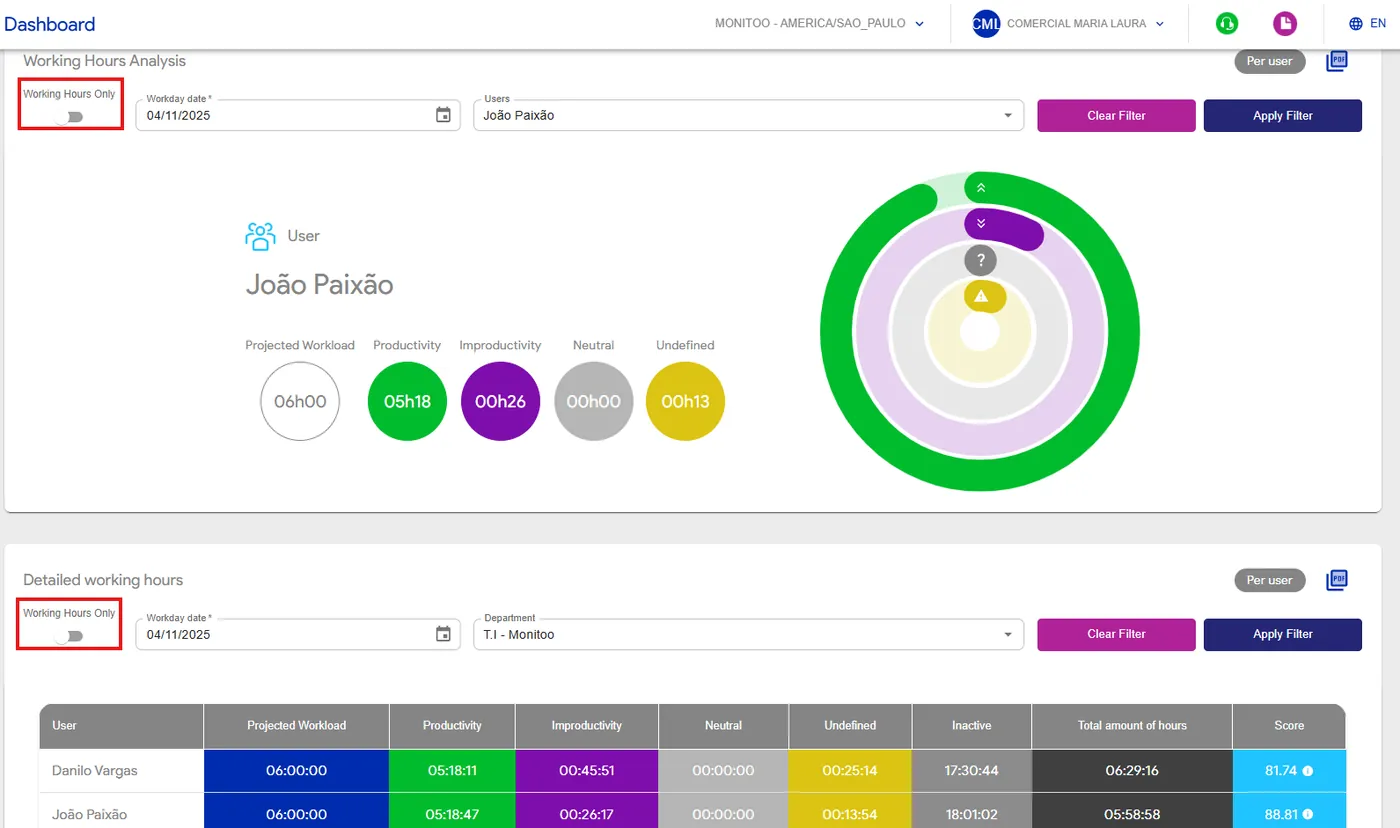
In this section, you’ll find complete information about what was accomplished during the work period, including indicators of productivity, unproductivity, and total activity time, along with a productivity score — all compared against the contractual registered work schedule.
You can use the “Workday Only” flag to filter records that occurred exclusively within defined working hours, automatically excluding any activity performed before or after the official work period.
The Productivity Score provides a clear view of team performance, showing how much of the total time was truly productive. It is calculated by adding up the hours classified as Productive and dividing that value by the total recorded hours, resulting in the productivity percentage. This indicator helps track employee efficiency and identify opportunities for time management improvement.
💡 Tip: Use this dashboard to visualize the projected workload and compare it with productive, unproductive, neutral, undefined, and inactive times — all accompanied by a productivity score based on these classifications.
See how:
Great! Thanks for your feedback.
Tell our team what was missing: contact support on WhatsApp.
